



















How Can I Add Indicators in MT5
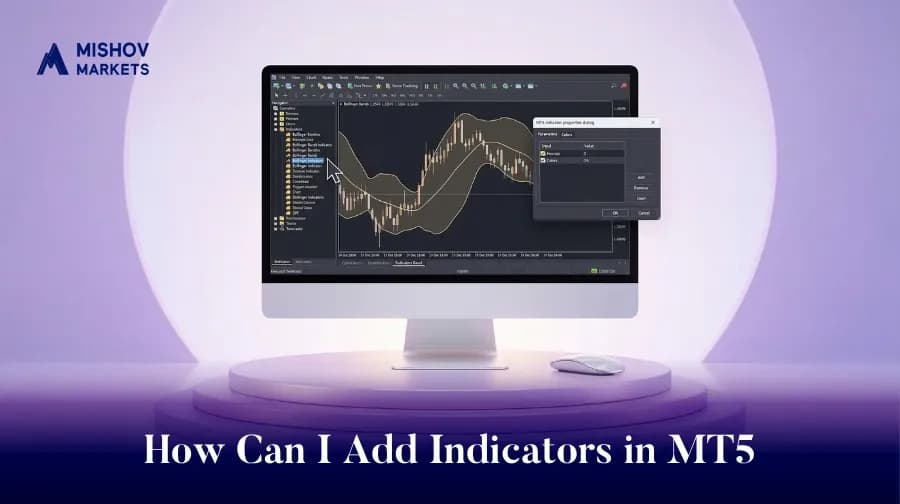
Indicators in MT5 are forex tools that have revolutionized how traders interact with the market, providing the flexibility to analyze price action and make informed decisions from virtually anywhere. Platforms such as MetaTrader 5 (MT5) or MetaTrader 4 (MT4) have responded to the growing popularity of trading by providing a feature-rich environment for both desktop and mobile users.
But unlocking the full power of MT5 means going beyond just placing buy or sell orders. One of the most critical features that every trader must understand is how to apply, install, and use both built-in and custom indicators, especially when trading on mobile. This article will explore in depth how to apply trading indicators onto the MT5 platform, install custom indicators, and get the most out of your trading experience with mobile indicator forex tools on the go.
How Do I Apply Trading Indicators to My MT5 Platform?
Trading indicators are essential analytical tools that help traders understand market behavior, identify patterns, and make strategic decisions. MT5 comes with over 80 built-in technical indicators, covering a wide range of categories such as trend-following, momentum, volatility, and volume-based indicators.
Step-by-Step Guide (Desktop):
1. Open the MT5 platform and select the chart of the instrument you want to analyze.
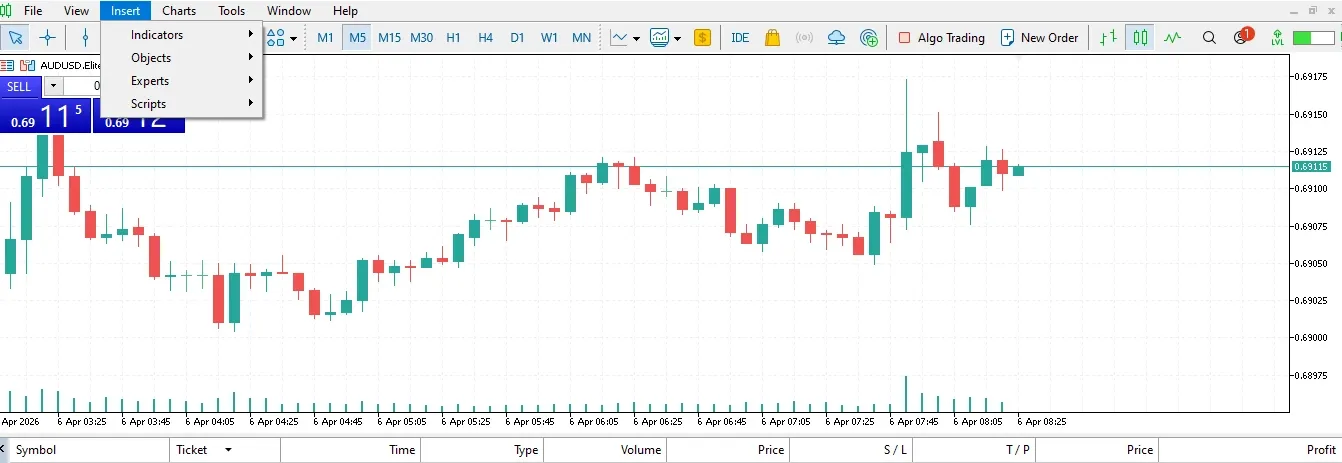
2. Click Insert → Indicators from the top toolbar.
3. Choose from categories like:
Trend (e.g., Moving Average, Bollinger Bands)
Volumes (e.g., On Balance Volume)
Bill Williams (e.g., Awesome Oscillator)
Custom (for imported indicators)
4. Configure settings such as time periods, levels, and colors.
5. Click OK to add the indicator to your chart.
Example Use Case:
Suppose you're day trading the EUR/USD pair and want to identify overbought or oversold levels. You can apply the Relative Strength Index (RSI) indicator to the chart. RSI values above 70 suggest an overbought market, while values below 30 indicate oversold conditions.
A study published in the Journal of Technical Analysis found that when RSI is used in combination with a Moving Average Convergence Divergence (MACD) signal crossover, the success rate for trade entries increases by 15% in trending markets. This proves that even basic built-in tools on MT5 can offer robust strategies when used properly.
How to Install Indicators on MT5 (Desktop)
While MT5 comes with many standard indicators, professional traders often want more advanced tools that suit their specific strategies. This is where custom indicators come into play. These are typically built using the MQL5 programming language and offer expanded functionalities such as automatic pattern recognition, custom volatility gauges, or predictive analytics.
How to Install Custom Indicators:
1. Download the indicator file in either `.mq5` (editable) or `.ex5` (compiled) format.
2. Open MT5 and click on File → Open Data Folder.
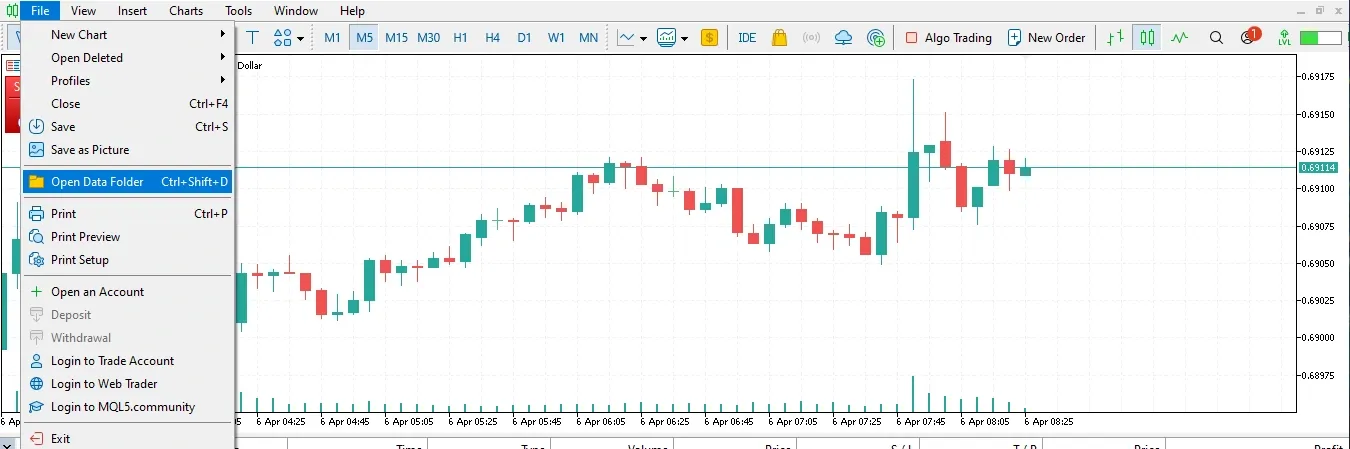
3. Navigate to: `MQL5 → Indicators`
4. Paste the indicator file into the Indicators folder.
5. Restart MT5 or refresh the Navigator panel (Ctrl + N).
6. Your new indicator will appear under Custom in the Navigator window.
Example: Installing SuperTrend
One of the most popular custom indicators is the SuperTrend, used to identify trend direction and ideal entry/exit points. Unlike simple moving averages, SuperTrend adjusts to market volatility. Many traders combine it with ATR (Average True Range) to optimize stop-loss levels.
According to a study by Forex Peace Army, traders using SuperTrend in combination with RSI and EMA (Exponential Moving Average) showed a 20% higher success rate in scalping strategies across EUR/USD and GBP/JPY in high volatility sessions.
Pro Tip:
Only download indicators from reputable sources like the official MQL5 marketplace or trusted forums. Always backtest new indicators in a demo environment before applying them in live trades.
Custom Indicators for MT5 Mobile
This is where the concept of mobile indicator forex becomes more nuanced. MT5 mobile apps (available on iOS and Android) are incredibly powerful, but they come with certain limitations compared to the desktop version, most notably, the inability to install third-party custom indicators directly.
However, this doesn’t mean traders can't leverage powerful analytics while on the go.
How to Add Built-in Indicators on MT5 Mobile:
1. Open the MT5 app and navigate to the chart of your preferred instrument.
2. Tap the wave form icon at the top of the screen, and then in the new window press the ƒ+ icon.
3. Select an indicator category:
Main window indicators like Moving Averages, Bollinger Bands
Subwindow indicators like RSI, MACD, and Stochastic
4. Configure the indicator settings (periods, colors, levels).
5. Tap Done, and the indicator will appear instantly.
Mobile Use Case Example:
Let’s say you’re traveling and monitoring trades from your phone. You notice a Bollinger Band squeeze (indicating reduced volatility). You pair this with a Moving Average crossover (e.g., 10 EMA crossing above 20 EMA), confirming a possible breakout. Even though you don’t have access to your desktop indicators, you can make a decision and enter the trade confidently.
Workaround for Custom Indicators:
Although you can’t add `.ex5` indicators on mobile, a hybrid workflow can help:
Perform deep technical analysis using custom indicators on your desktop.
Set alerts or price levels on MT5.
Use mobile to monitor, modify, or close trades based on real-time price action and built-in mobile indicator forex tools.
This method is increasingly popular among swing traders and scalpers who need to stay mobile but still rely on advanced setups.
Statistical Insight:
According to a 2023 report by Finance Magnates, over 63% of retail forex traders actively use mobile platforms to monitor their trades, with 47% relying solely on MT5’s mobile indicators for decision-making. This shift emphasizes the importance of optimizing your mobile indicator strategy.
Best Practices for Using Mobile Indicators in Forex
If you’re going to rely on mobile indicator forex tools, here are some best practices to ensure success:
1. Keep It Simple
Mobile screens are smaller, and data overload can lead to analysis paralysis. Stick to 2–3 indicators at most, like RSI, MACD, and EMA.
2. Combine Price Action
Use indicators as a supplement, not a crutch. Combine them with price action patterns like pin bars, inside bars, and engulfing candles. For example, RSI divergence combined with a bullish engulfing candle near support levels often signals a strong reversal.
3. Use Alerts Wisely
Set mobile alerts for price levels, indicator crossovers, or volatility shifts. This can save you time and ensure you act quickly when a setup appears.
4. Leverage Cloud Syncing
Use the same account login on both desktop and mobile to sync charts, templates, and trade history. This helps bridge the gap between your high-level analysis and day-to-day trading flexibility.
Why Mobile Indicator Forex Tools Are the Future
The forex industry is moving toward more mobile and automated systems. In an era where traders are global and markets move 24/5, being tied to a desk is no longer necessary or even efficient.
Mobile indicator forex technology is helping democratize trading access. With MT5, even beginner traders can start with a smartphone, apply technical indicators, and learn the market’s rhythm before graduating to more complex tools. As mobile app development becomes more advanced, it’s only a matter of time before custom indicators are integrated directly into mobile platforms.
Financial institutions are taking notice. A report from Statista shows that mobile trading volumes have doubled from 2020 to 2024, with the Asia-Pacific region leading adoption. Brokers and platforms are under pressure to make mobile tools as effective as desktop ones.